
MyTRS—Employers adding and editing plan rates
It is that time of year again where most Medicare related plans update prices for January.
It is critical that you review our instructions. In the past, when employers did not follow our instructions, the following occurred:
- employers altered prior-year plan prices rather than adding a new row for a price (resulting in large inaccurate retroactive rebills for retirees),
- employers erroneously stopped deductions for their retirees by adding stop dates*,
- employers added plans with a final price of $0.01 (which resulted in a $0.01 deduction for retirees for January), and
- employers selected unnecessary plan options (resulted in plan menus packed with extra unused or non-existent options).
Please visit our online training and guides page to view our comprehensive training videos and manuals including the Retiree Insurance in MyTRS guide – 2024 or if you would like a physical copy of our manual, email InsuranceUpdates@trb.state.ma.us to request a 2024 edition mailed to you. Prior editions of this guide are out of date.
*REMINDER: Employers should never enter a stop date during the plan price update process.
Did you know?
You can use your filters to see which retirees are on a plan? To use this function, follow these steps:
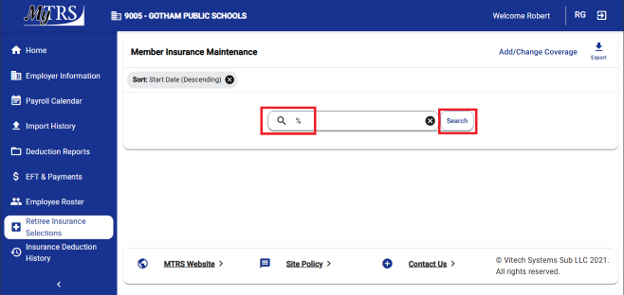
Step 1:
Enter a % symbol into the search box and click Search
Step 2:
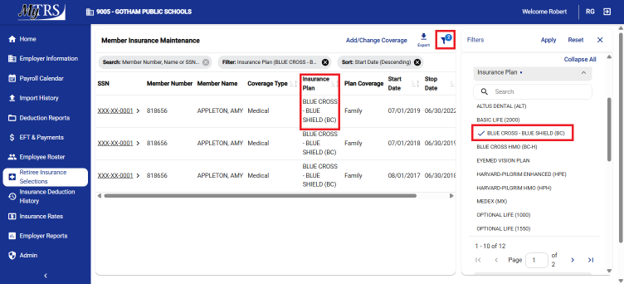
Use the filter to select a plan to see which retirees are on that plan. In the example below, Amy Appleton is the only retiree on the Blue Cross (BC) plan selected.
Reminder: “Premium Holidays”
If your insurance carrier offers a premium “holiday,” we encourage you to coordinate directly with your carrier to facilitate the premium refund.
MyTRS cannot process short-term rate holidays with a price of $0.00. Employers can enter a rate of $0.01 for a month and then, the next day, re-enter the correct rate for the following month.
Do not enter a series of months for a plan with different costs on the same day because it will trigger incorrect billing. If you want to add a row to change a plan rate to $0.01 for a particular month, please wait overnight to add the second row for the next month with the restoration price.
If your premium “holiday” is equal to exactly one month’s premium, and $0.01 will not suffice, you can enter it manually for your retirees. To do this, perform a cancel function to enter a stop date on each retirees’ deduction, then immediately enter a change function to add a new rate line to each retiree to restart the deduction a month later. With this process, you have full control over the rate “holiday” and can avoid any complications that batch processing can present.
The process for entering rate holidays is thoroughly explained in Chapter 14 – Premium Rate Holidays.
Questions?
If you have any questions, please send them to InsuranceUpdates@trb.state.ma.us.